Key Updates from Salesforce Summer ’26 Release
Every Salesforce release promises innovation, but when you’re working hands-on with clients every day, the real question is: what will actually make things easier for you and your team?
As a senior consultant at Canvas Cloud supporting Salesforce implementations, optimizations, and ongoing managed services, I look for updates that reduce admin overhead, improve governance, and create better user experiences without adding unnecessary complexity.
Here are the Salesforce Summer ’26 updates that stand out most from a practical, day-to-day perspective across platform management, reporting, Flow automation, service operations, and governance.
1. Platform & Ecosystem Changes
Chatter Is Turned Off by Default in New Orgs:
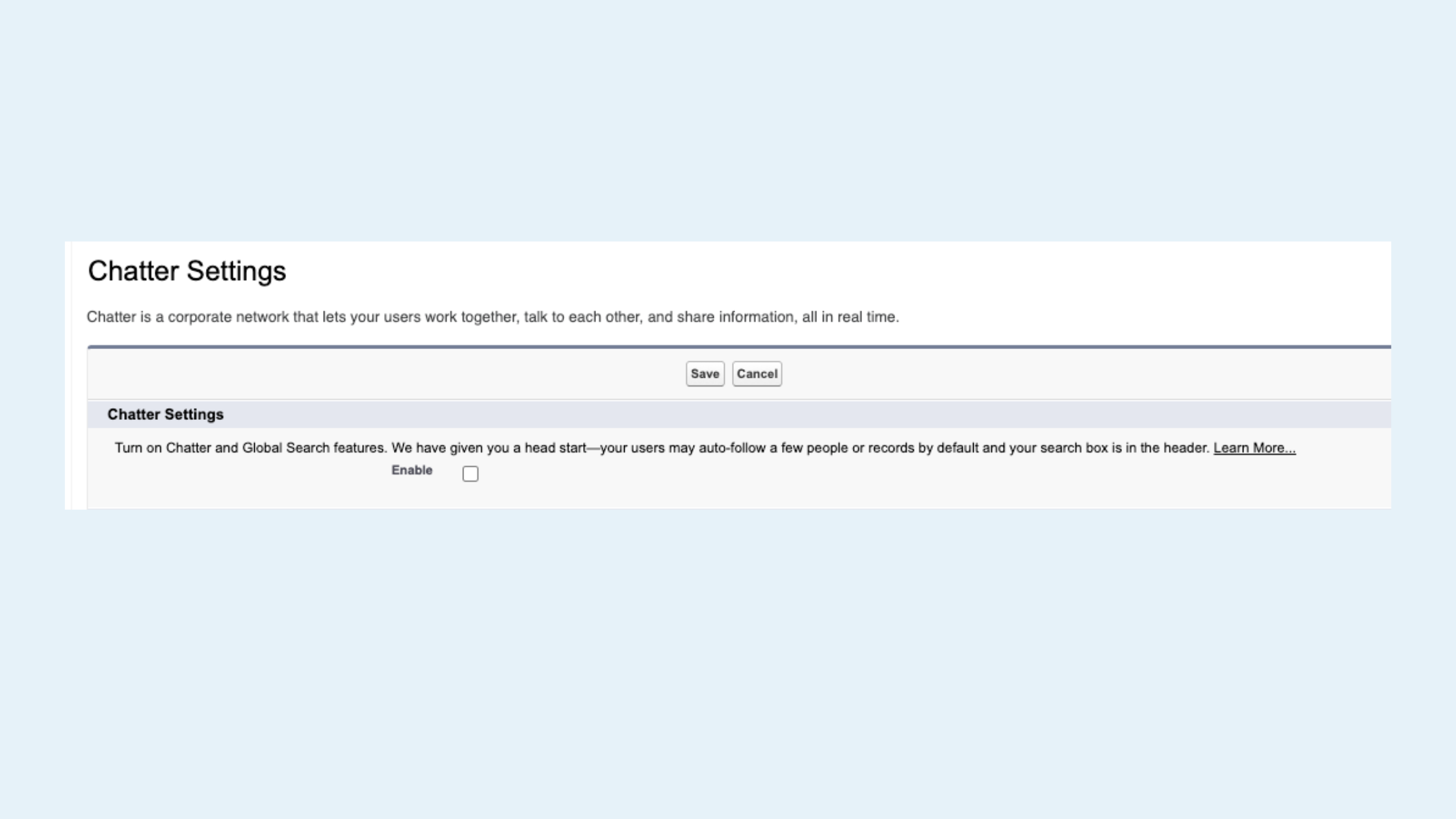
Salesforce Summer ’26 Release: Chatter Settings
What’s New: In new Salesforce orgs created in Summer ’26 and later, Chatter is turned off by default. If your organization relies on features that require Chatter functionality or APIs, admins will need to enable it manually in Setup. Existing orgs are unaffected.
My Take: This is another clear signal that Salesforce sees Slack as the long-term collaboration layer across the ecosystem. Most newer orgs probably won’t miss Chatter, but organizations with legacy Experience Cloud implementations, Case Feed dependencies, or orgs where Slack is not supported should pay close attention during migrations and new implementations.
Salesforce Web Console:
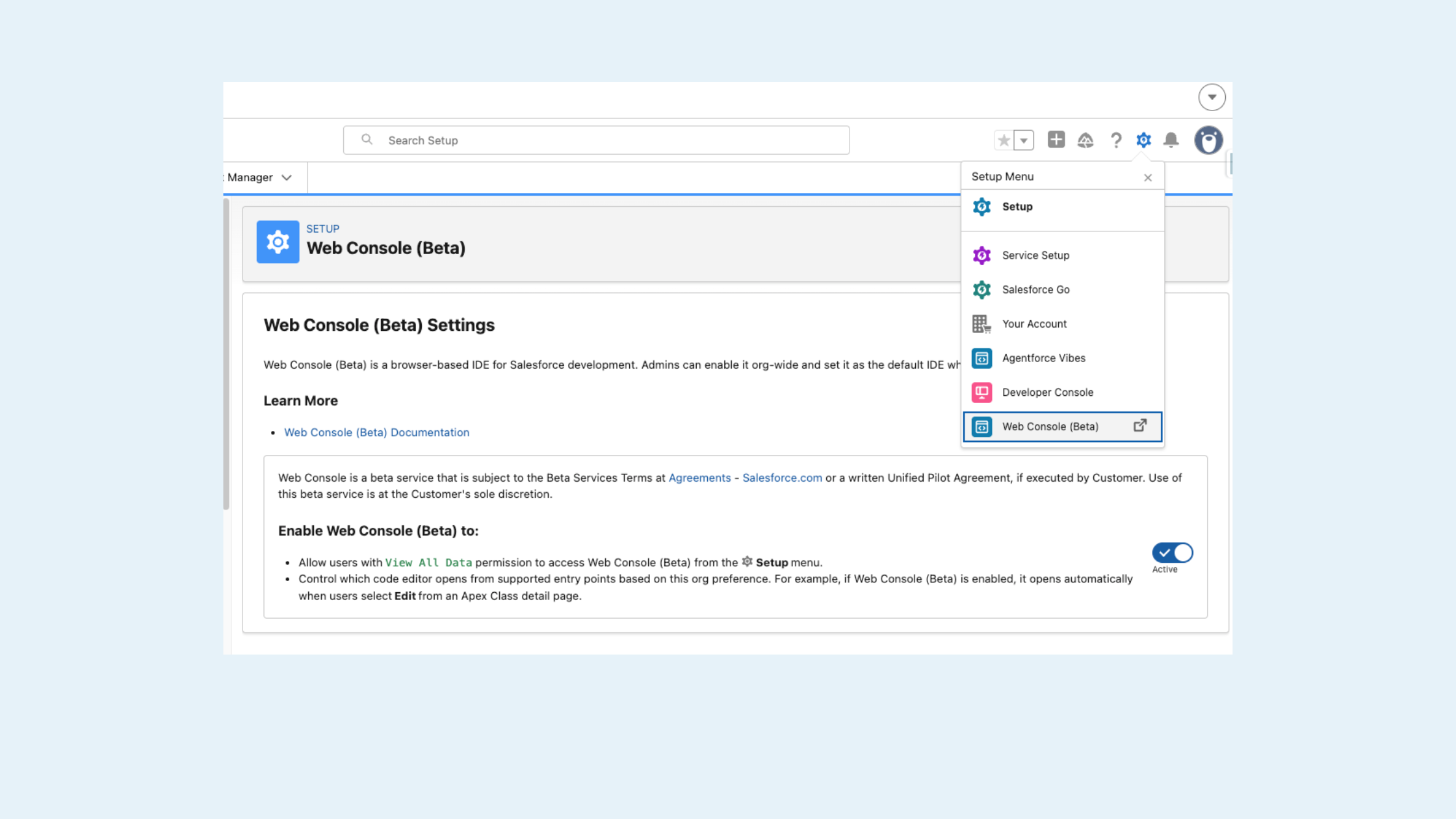
Salesforce Summer ’26 Release: Web Console Settings - Image 1
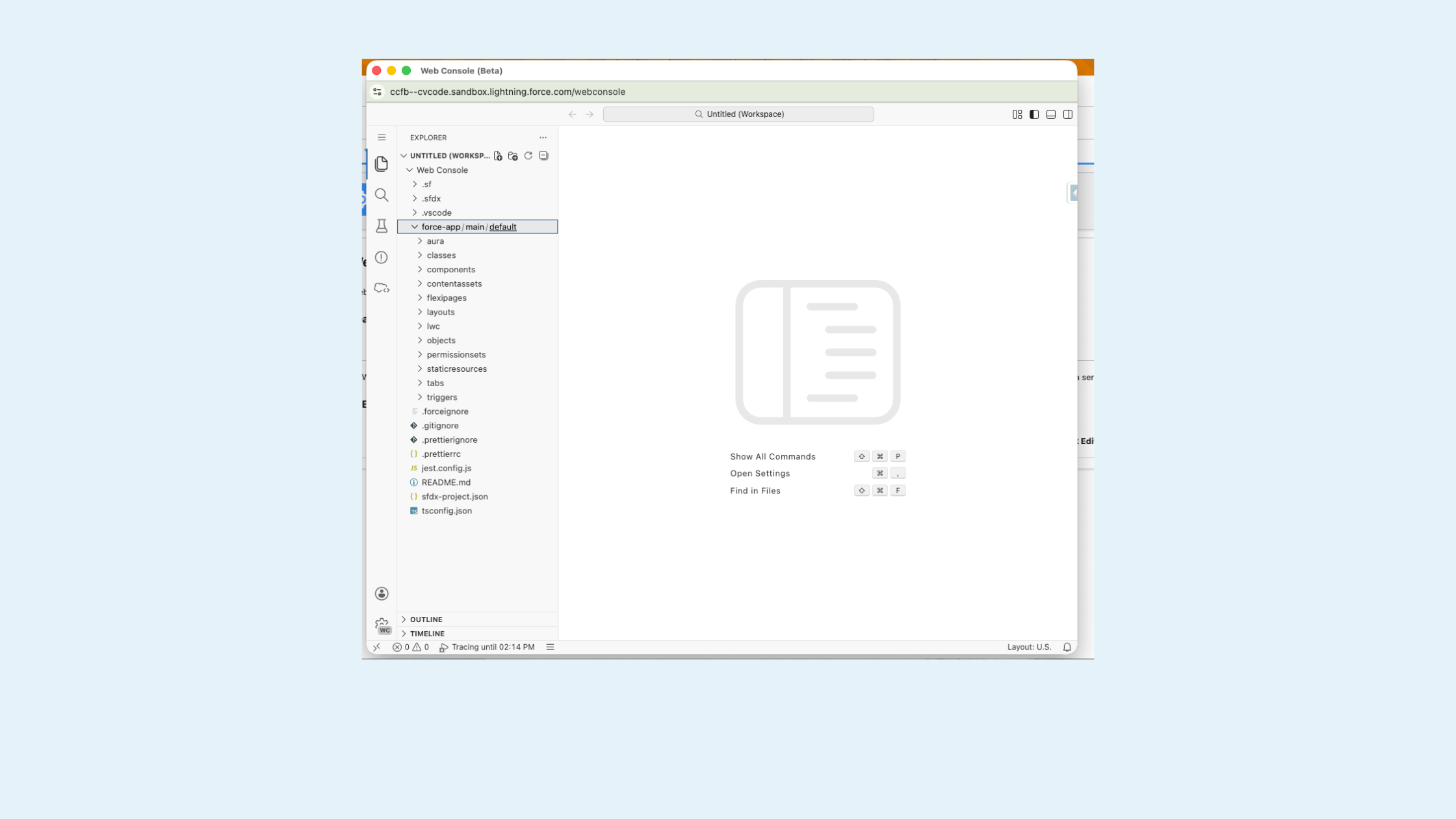
Salesforce Summer ’26 Release: Web Console Settings - Image 2
What’s New: Summer ’26 introduces the Salesforce Web Console, a lightweight browser-based IDE built directly into Salesforce orgs. It’s positioned as the successor to the legacy Developer Console and is available across all org types, including free and developer orgs.
My Take: The Developer Console has felt overdue for modernization for years. This update won’t replace full developer tooling like VS Code, but for admins and consultants who need quick troubleshooting, SOQL queries, or debugging inside the browser, this is a welcome improvement.
2. Reporting & Analytics Improvements
Brand Color Palettes for Reports and Dashboards:
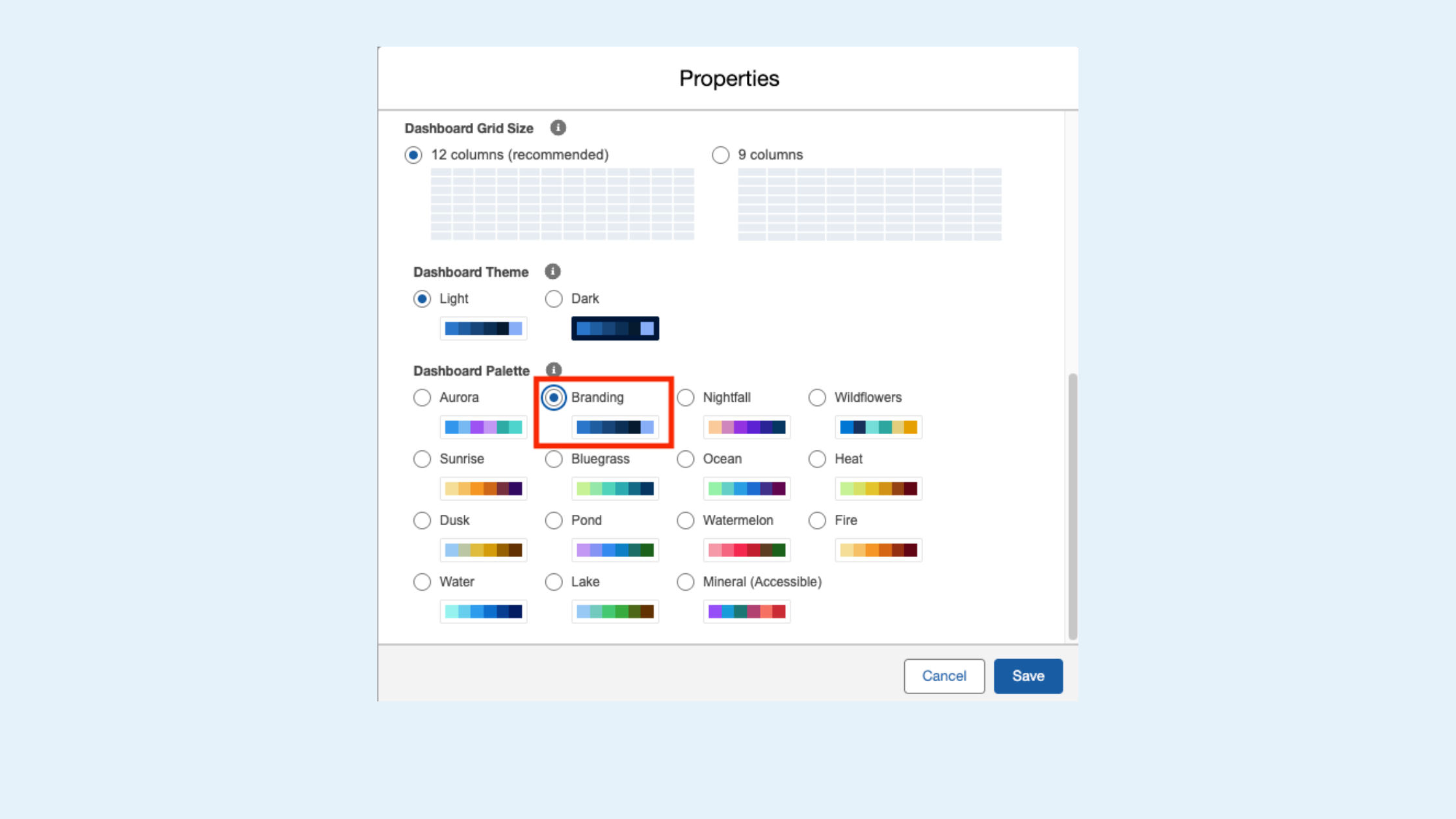
Salesforce Summer ’26 Release: Brand Color Palettes
What’s New: Organizations can now configure reusable brand color palettes within Salesforce theme settings and apply them across reports and dashboards.
My Take: This sounds small, but it solves a surprisingly common UI issue. Many organizations end up with dashboards that all look slightly different depending on who created them. Centralized palettes help standardize reporting while also improving accessibility and branding consistency.
More Row-Level Formulas in Reports:
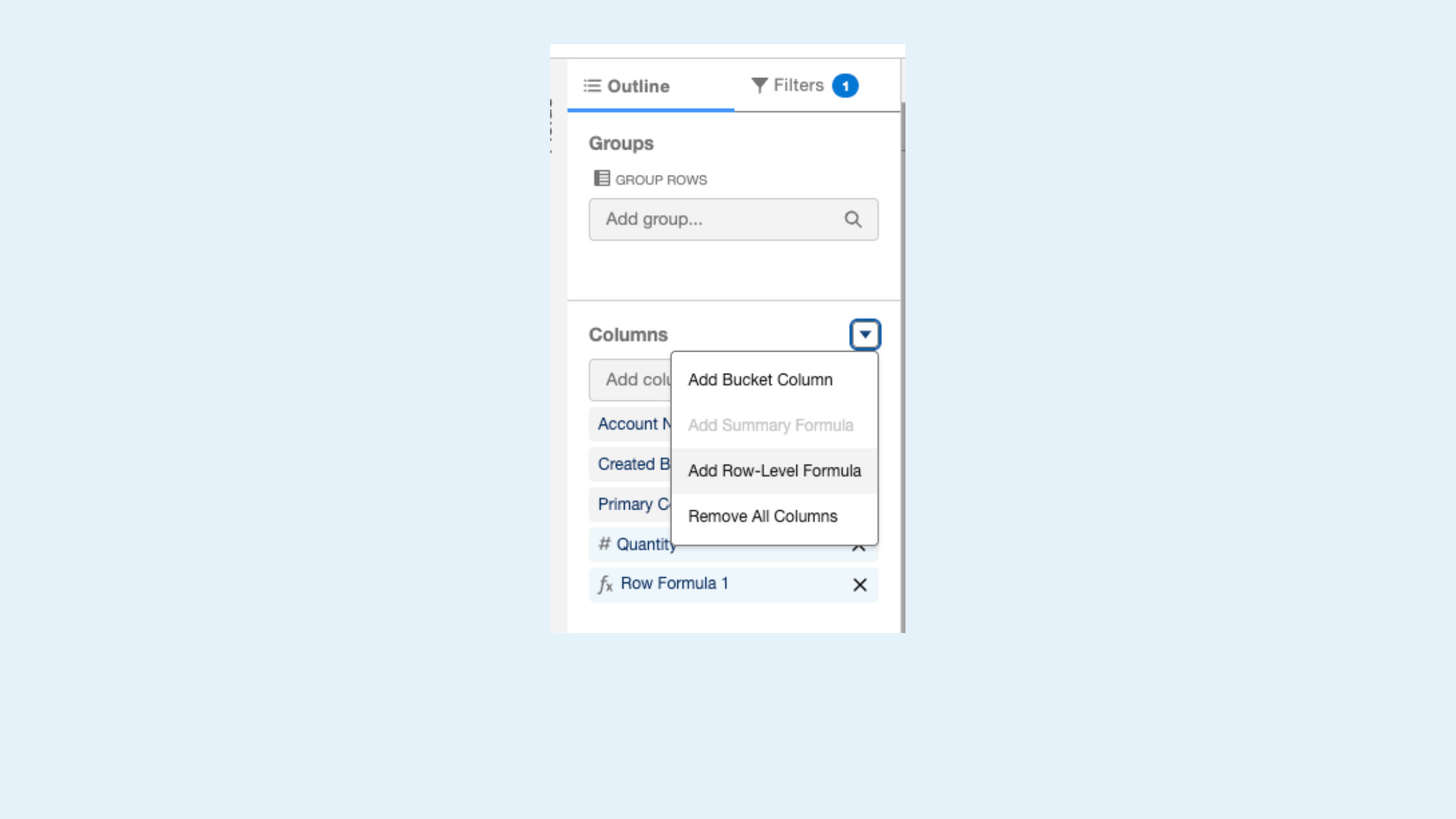
Salesforce Summer ’26 Release: Additional Row-Level Formulas
What’s New: Salesforce reports now support up to two row-level formulas instead of one. Teams can calculate values directly within reports without adding formula fields on objects. For example, admins can calculate both commission rates and time-to-close metrics within a single report.
My Take: This is one of those admin quality-of-life updates that quietly removes unnecessary workarounds. Being able to calculate multiple metrics directly inside reports reduces the need for additional formula fields and makes reports more flexible for operational teams. For example, calculate both the commission rate and the time-to-close metric in a single report.
Report on Messaging Sessions:
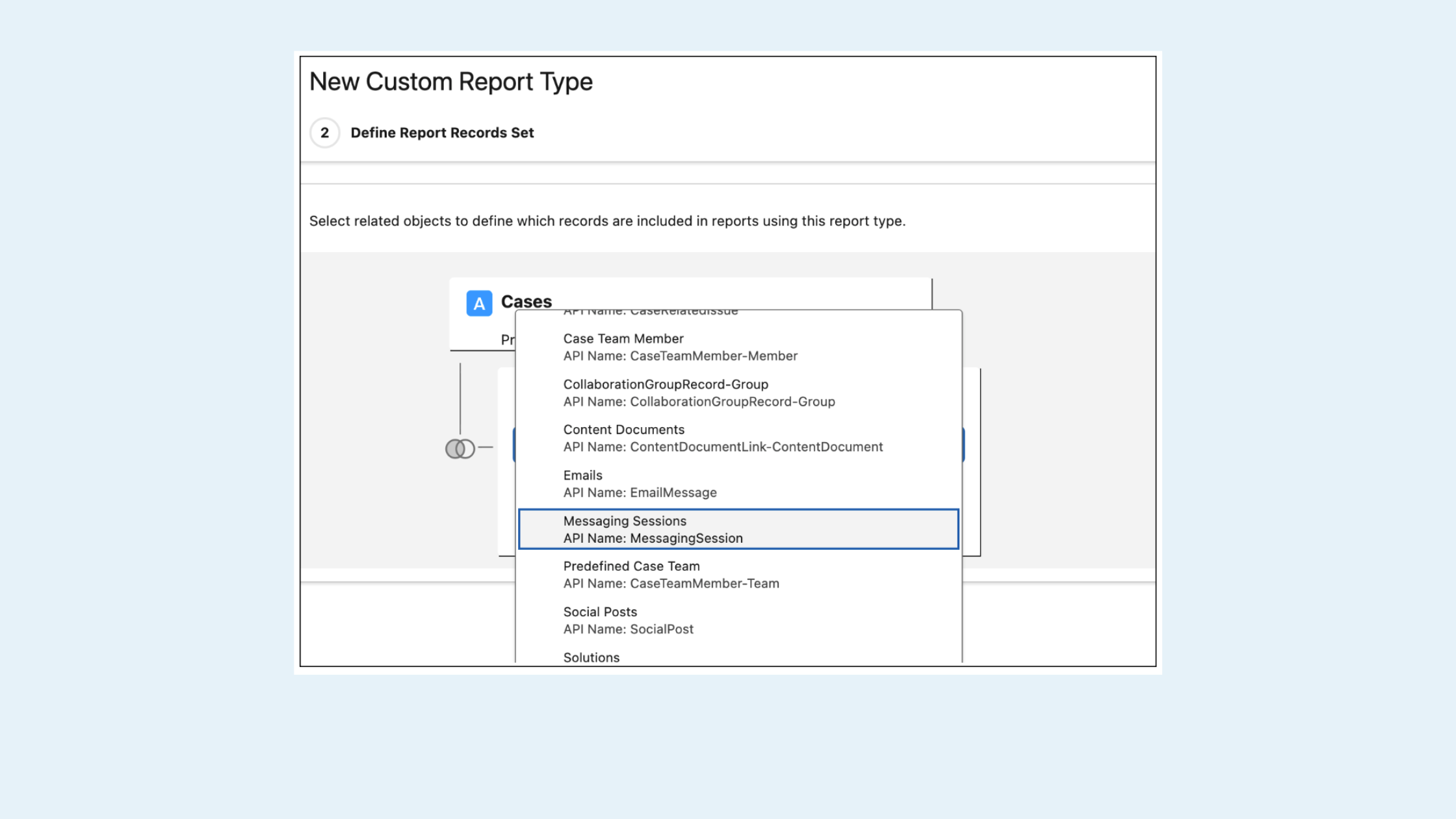
Salesforce Summer ’26 Release: Messaging Sessions Reports
What’s New: Messaging Sessions can now be selected as a related object on Cases when creating custom report types. This makes it possible to report on messaging activity directly in the context of case management, something that previously required workarounds or separate reporting structures.
My Take: This closes a frustrating reporting gap for Service Cloud teams using messaging channels. Previously, organizations often had to rely on custom reporting workarounds just to analyze messaging activity alongside case data.
3. Flow & Automation Enhancements
Summer ’26 continues Salesforce’s broader push to make Flow more scalable, maintainable, and admin-friendly. Several of the strongest updates in this release focus on reducing friction for automation teams.
Date Operators in Decision Logic:
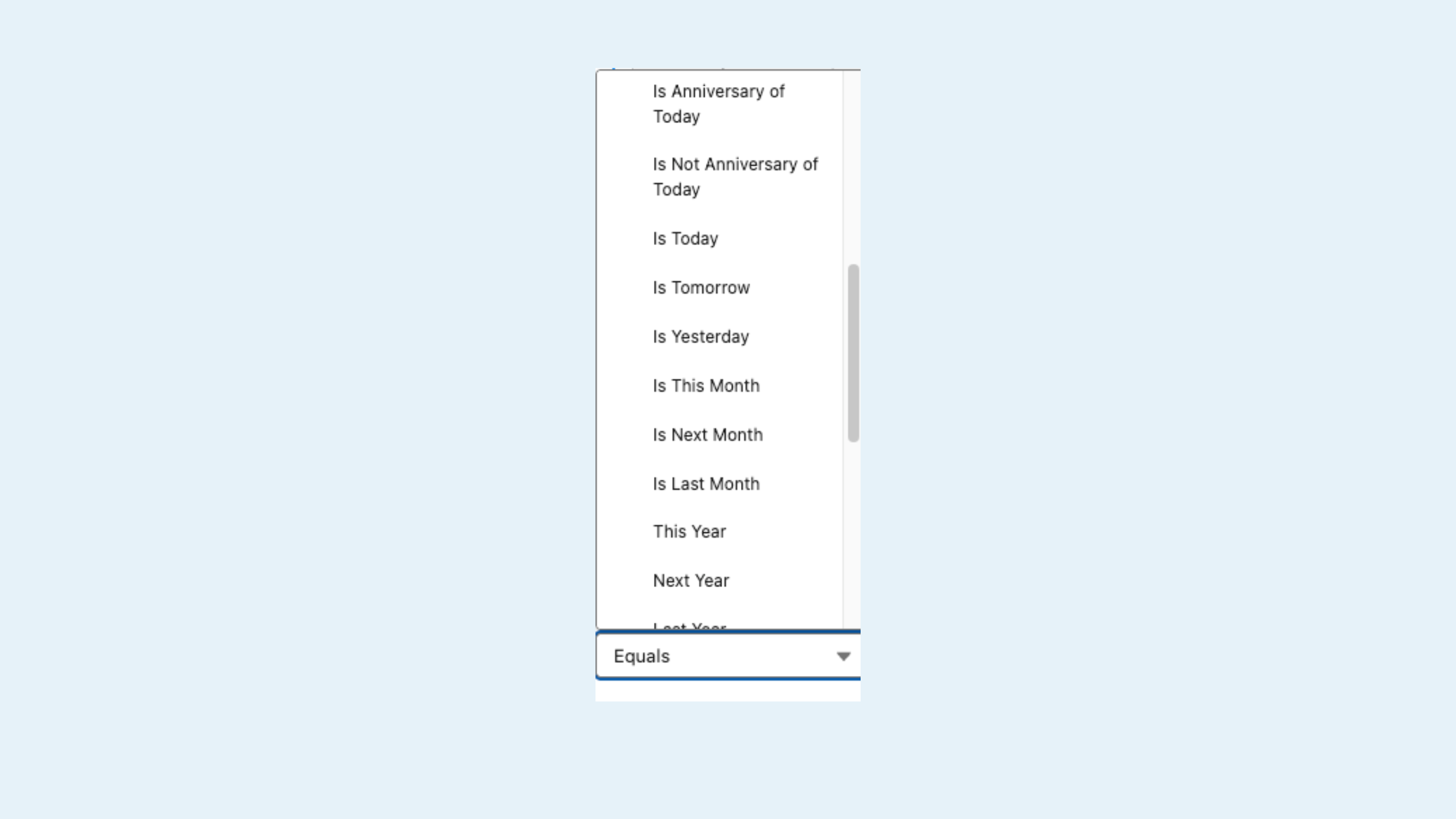
Salesforce Summer ’26 Release: Date Operators
What’s New: Decision elements now support date operators such as Is Today, Is Anniversary of Today, and Last Number of Days when conditions use date data types. This allows admins to create date-based branching logic without relying on complex formula workarounds.
My Take: This update helps you model recency and milestone logic removing a lot of small but annoying formula workarounds that admins have been building for years. It’s a cleaner, more readable way to handle date-driven automation logic.
Radio Button Groups for Screen Flows:
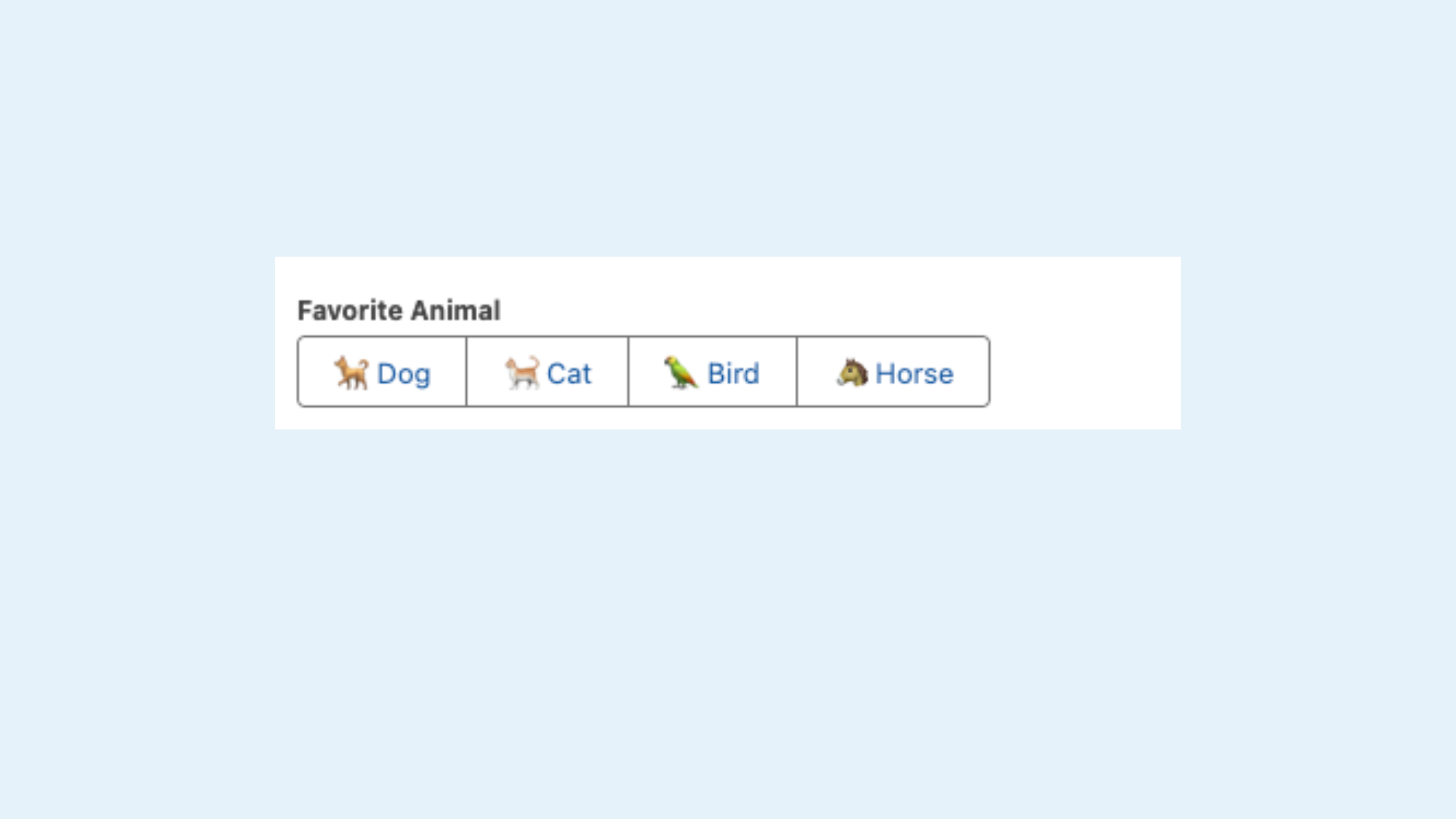
Salesforce Summer ’26 Release: Radio Button Groups
What’s New: The new Radio Button Group component functions similarly to the traditional Radio Buttons component, allowing users to select a single option at run time. Choices can now appear horizontally on desktop or vertically on mobile, creating a cleaner and more compact user experience.
My Take: This is primarily a usability improvement, but it makes Screen Flows feel much more modern. It reduces scrolling and provides a modern alternative to traditional radio buttons, checkboxes, or picklists. Small UX updates like this can noticeably improve user adoption, especially for organizations relying heavily on internal guided workflows.
Visualize Flow Execution Paths During Testing:
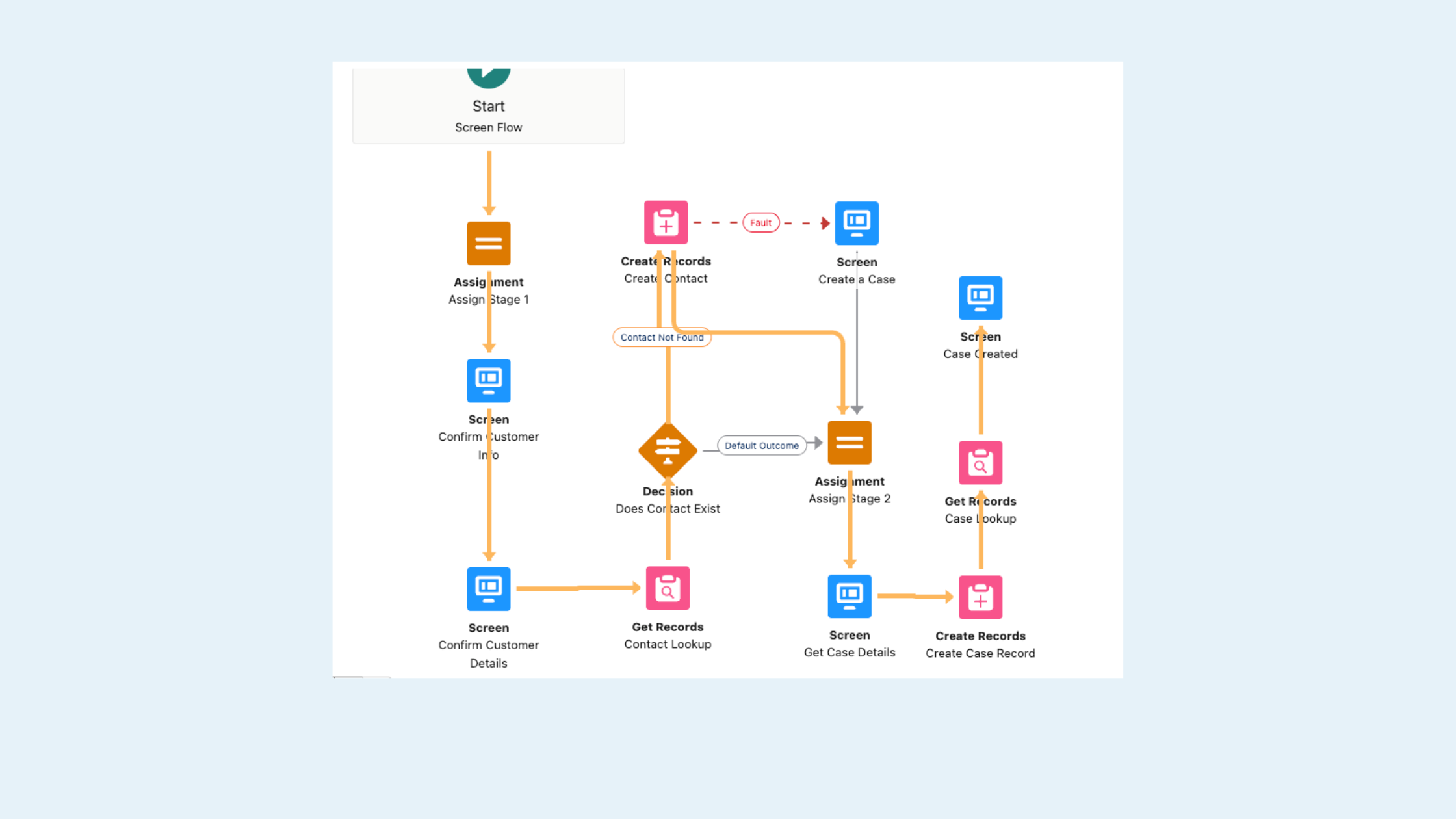
Salesforce Summer ’26 Release: Flow Execution
What’s New: When manually testing Screen Flows, Salesforce now highlights the execution path directly on the Flow canvas after the test completes.
My Take: Troubleshooting complex flows can become extremely difficult once multiple branches and conditions are involved. This new visual execution tracing should significantly reduce debugging time for admins and consultants. Previously, flow tests did not display execution paths after completion. The new tracing visualization appears when tests reach Completed, Paused, Waiting, or Error states and highlights every element touched during execution, even if those elements were not part of the final completed path.
Collapsible Fault Paths:
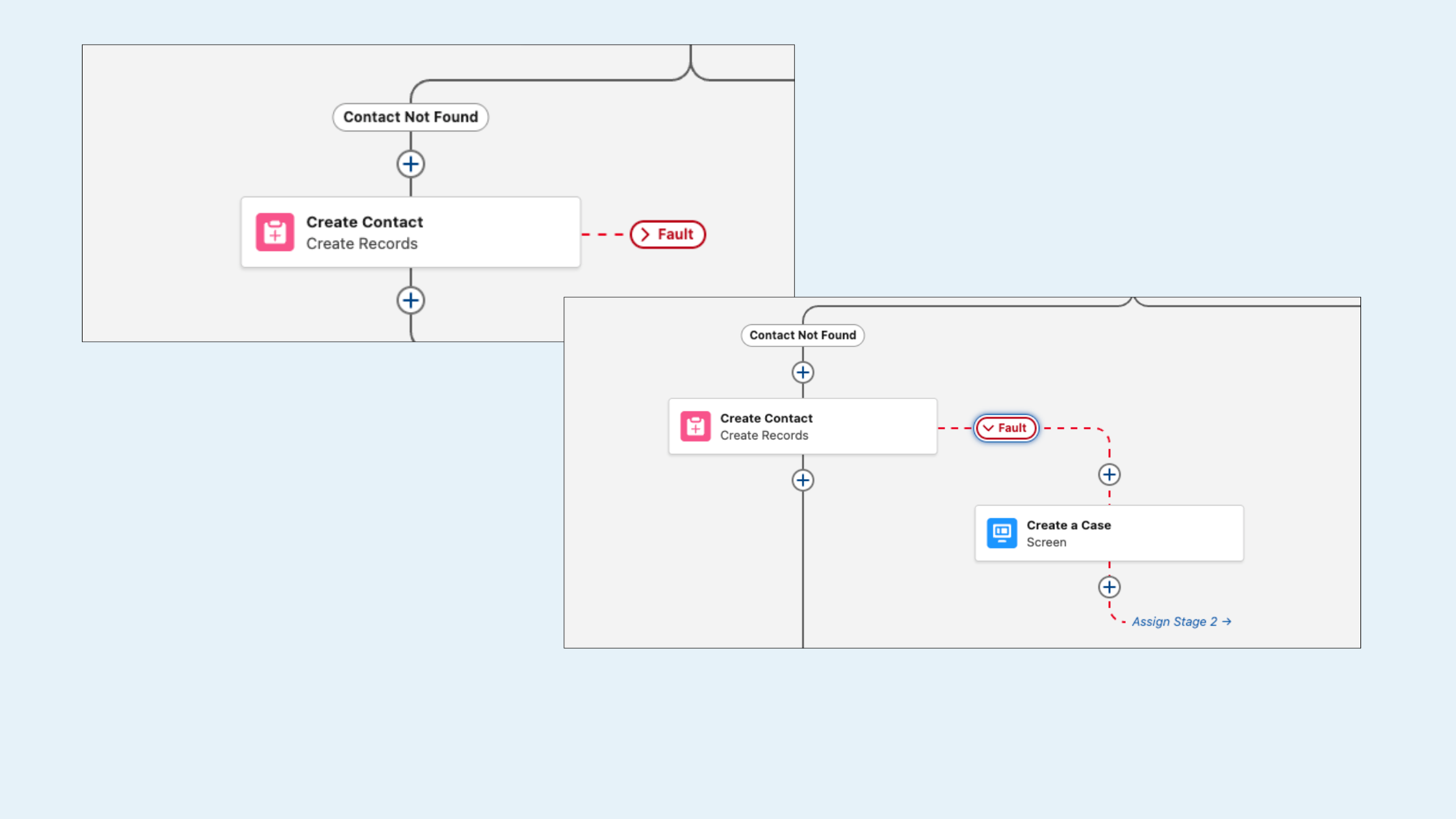
Salesforce Summer ’26 Release: Collapsible Fault Paths
What’s New: Building on Spring ’26’s ability to collapse and expand Decision and Loop elements, Summer ’26 extends that same capability to fault paths within Flow Builder. Complex flows with extensive error-handling logic can now be collapsed to keep the canvas cleaner and more focused. Fault paths can remain hidden while admins work on other sections of the flow and expanded only when needed.
My Take: This is another strong usability improvement for organizations managing enterprise-scale automation. Large flows become difficult to maintain quickly, especially when error handling adds multiple branches across the canvas. Anything that improves readability and reduces visual clutter makes troubleshooting, documentation, and long-term maintenance significantly easier.
Lookup Fields in Data Tables:
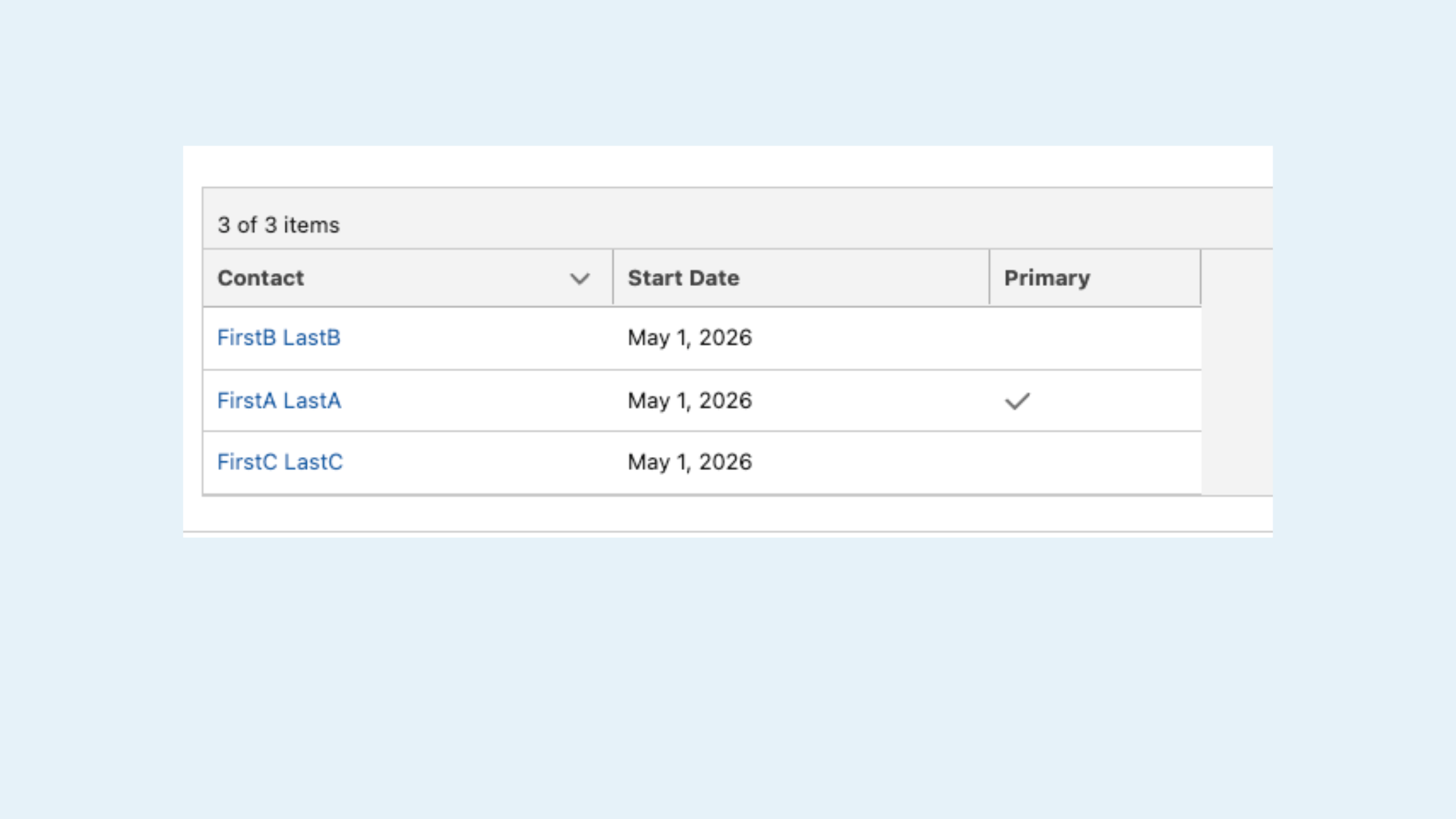
Salesforce Summer ’26 Release: Lookup Fields
What’s New: Data Tables in Screen Flows can now display related record names instead of raw Salesforce Record IDs when using lookup fields. Admins can also configure those values as clickable links that navigate directly to related records.
My Take: Admins have wanted this for a long time. Displaying raw IDs always felt awkward and unfinished from a user experience standpoint. This removes several common workarounds, like adding Formula Fields on Objects to display related record names, and makes Screen Flows feel far more polished.
Configurable Batch Sizes:
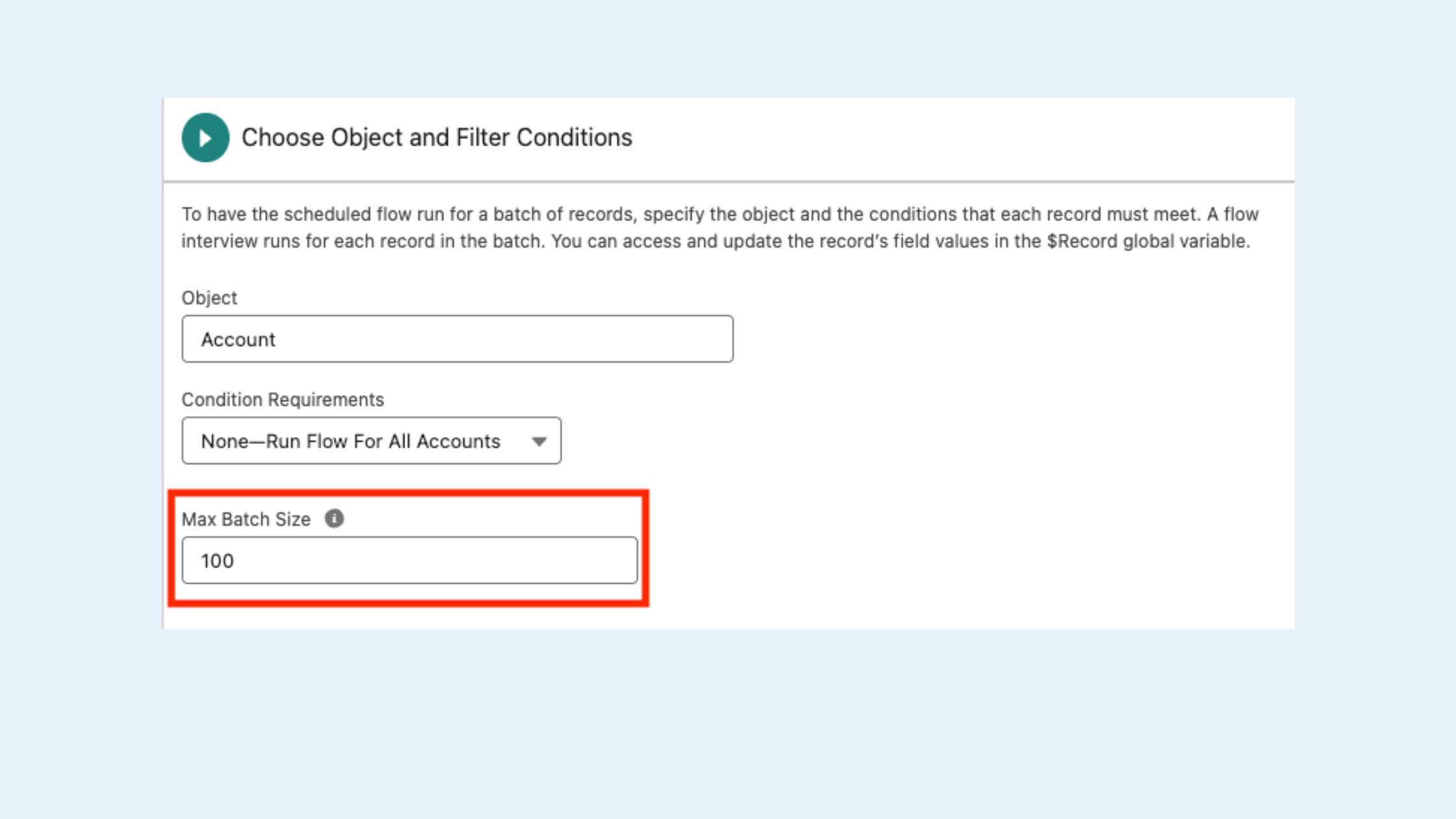
Salesforce Summer ’26 Release: Configurable Batch Sizes
What’s New: Schedule-triggered flows now allow admins to configure maximum batch sizes instead of relying on the default 200-record processing limit. Smaller batch sizes can help reduce the risk of hitting Apex governor limits and improve resilience when processing large datasets.
My Take: This is a major governance improvement for larger orgs. Giving teams more control over how flows process records helps reduce governor limit risks and creates more flexibility for high-volume automation environments.
Global Flow Resources for Reusable Mappings:
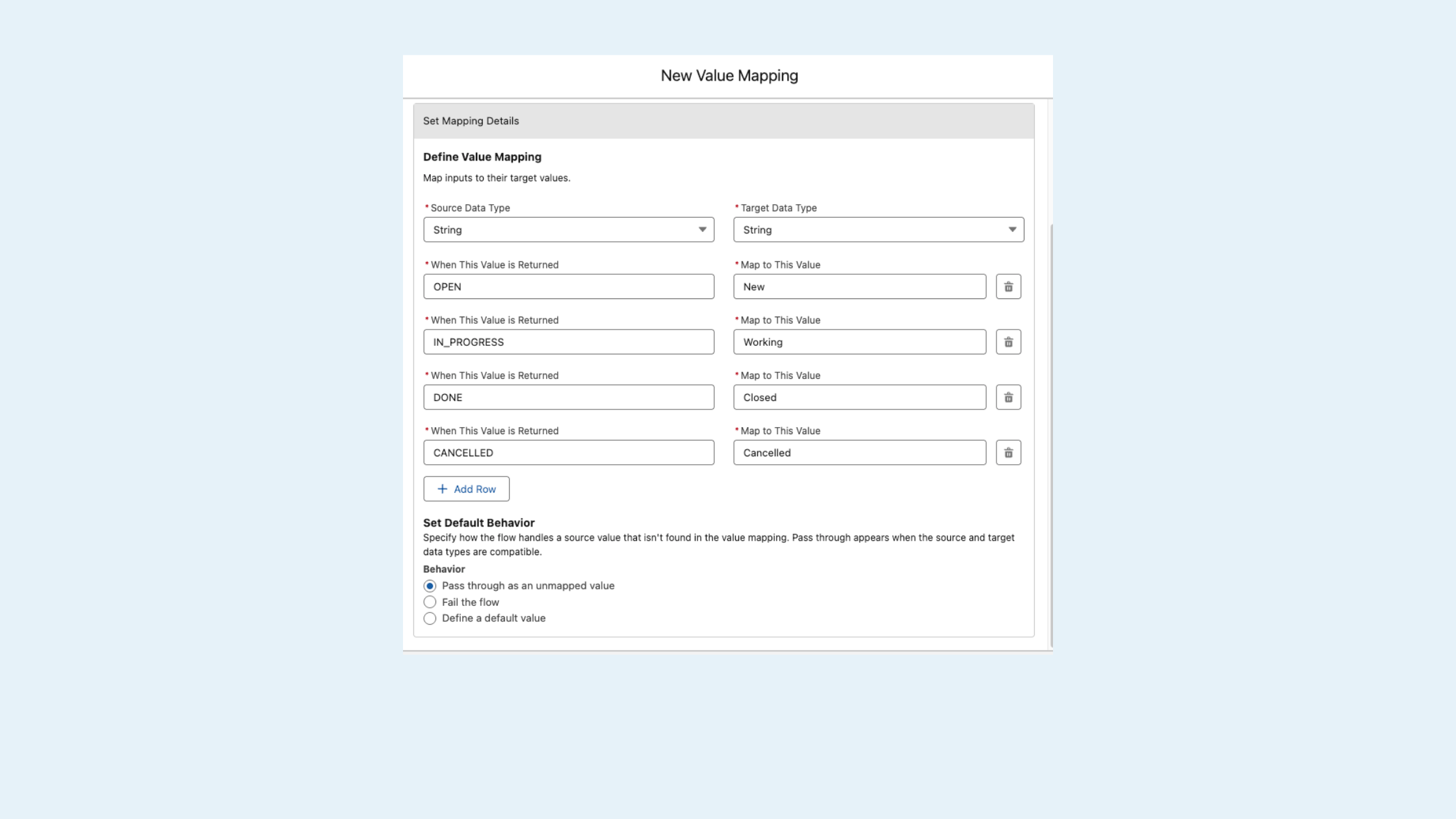
Salesforce Summer ’26 Release: Global Flow Resources
What’s New: Using new Global Flow Resources in the Automation app, admins can create reusable mappings and reference them across multiple flows that support the Transform element. Instead of recreating the same mapping logic repeatedly, teams can define it once and reuse it across automations.
My Take: This is exactly the kind of maturity improvement Flow needed. Reusable resources reduce duplication, simplify maintenance, and support more scalable automation architecture across larger Salesforce environments.
Element Error Rate Column
What’s New: The Automation app now includes an Element Error Rate column within the Flow list view. This displays the percentage of flow elements that encountered errors during the most recent run without requiring admins to open individual flow records or debug logs.
My Take: Anything that improves visibility into Flow health without forcing admins into debug logs is a win. This should help teams identify problematic automations much faster, especially in orgs with large numbers of active flows.
4. Service Cloud & Experience Cloud Updates
Experience Cloud Case Assignment Rules
What’s New: Standard Case Assignment Rules can now run automatically for records created through Experience Cloud sites. Organizations can now manage routing logic centrally using standard assignment rules instead of maintaining separate processes for external channels.
My Take: This simplifies administration significantly for organizations supporting both internal and external service channels. Centralized routing logic is easier to maintain and reduces the risk of inconsistent assignment behavior.
Email Template Usage Tracking
What’s New: The Last Used Date and Times Used fields on email templates now update when templates are used through the Lightning email composer on Cases. Previously, these metrics only updated when templates were selected using the Send an Email button.
My Take: This is another small but valuable operational improvement. Better usage tracking helps teams identify outdated templates, improve governance, and understand what content users are actually relying on.
Automatic First Response Time Tracking
What’s New: Salesforce now automatically captures Service Rep First Response Time for messaging sessions, marking the exact moment an agent sends their first reply.
My Take: This eliminates a surprising amount of custom development work that many service organizations previously needed just to measure response SLAs accurately. Native tracking should make service reporting much easier and more reliable.
5. Governance & Security Improvements
New Field Access Tab:
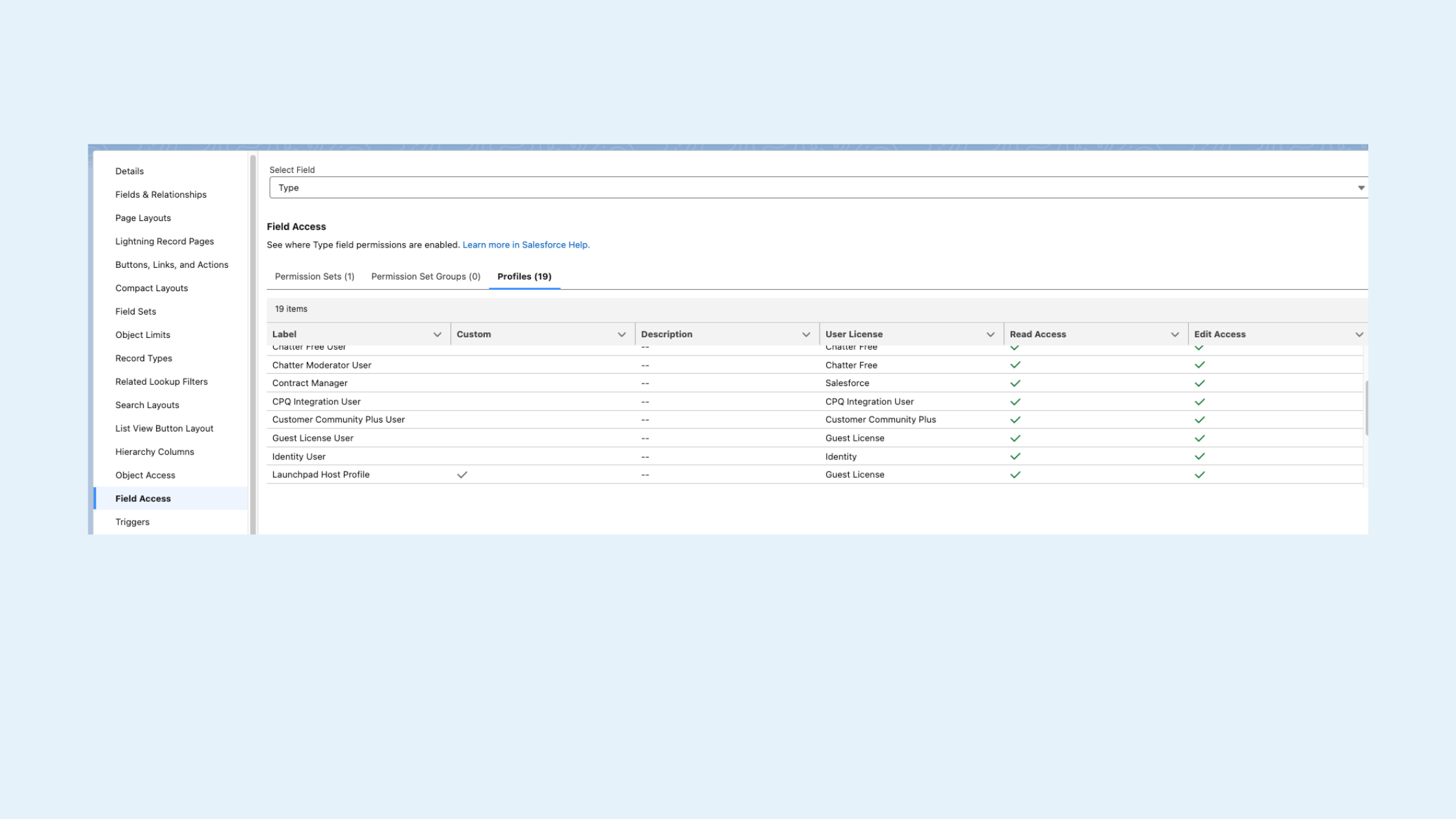
Salesforce Summer ’26 Release: Field Access Tab
What’s New: A new Field Access tab in Object Manager provides a consolidated matrix view showing how field-level access is granted across Profiles, Permission Sets, and Permission Set Groups for every field on an object.
My Take: For admins managing complex security models, this is one of the most valuable updates in the release. Permission troubleshooting often turns into spreadsheet archaeology. Having centralized visibility directly inside Object Manager should save a tremendous amount of time.
Final Thoughts
The Salesforce Summer ’26 Release is less about flashy reinvention and more about operational refinement.
Many of the strongest updates focus on Flow governance, admin usability, reporting flexibility, and reducing maintenance overhead. While some enhancements may seem incremental individually, together they point toward a Salesforce platform that continues to mature operationally behind the scenes.
For admins, architects, consultants, and operations teams, these are the kinds of improvements that can quietly make a major impact over time.
At Canvas Cloud, this is exactly the kind of release that helps us:
Implement smarter from day one
Optimize existing orgs with less disruption
Deliver more value through ongoing Salesforce support with our Collab Managed Services model.
If you’re curious which of these features make sense for your org or want help turning them on the right way, Let’s talk!
Source: Salesforce Summer ’26 Release Notes
About the Author
Christina Lytle is a Senior Salesforce Consultant at Canvas Cloud helping nonprofits and small businesses simplify operations, improve reporting, and get real value from their CRM. Her background in theatre administration shapes a collaborative, detail-driven approach to every engagement. Connect with Christina on LinkedIn.