What Is Agentforce 1 Edition (A1E)? A Practical Guide for Everyday Salesforce Users
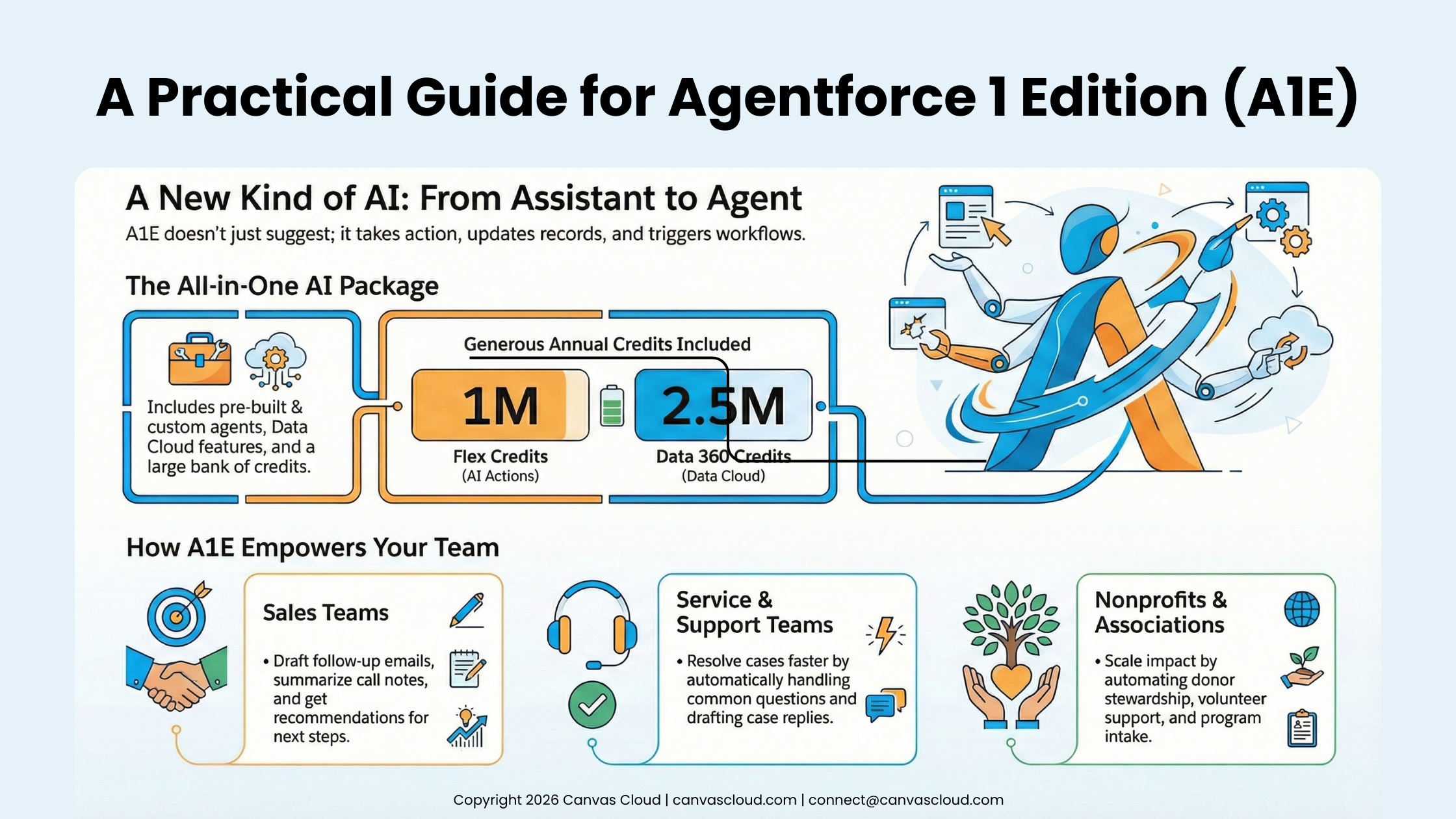
Salesforce has been rolling out AI features for years, but Agentforce marks a major shift: AI that doesn’t just assist you, it actually takes action for you.
And with Agentforce 1 Edition (A1E), Salesforce users now get a unified package of AI agents, automation capabilities, data intelligence, and advanced tools that work across Sales, Service, Field Service, Industry Clouds, and Experience Cloud.
If you’re a Salesforce user, you may be asking:
What do I get with A1E?
Where do these AI agents actually show up in my day-to-day work?
How do they help me do my job faster?
Do I need to be technical to use them?
This guide breaks it down in clear, approachable language, so you can understand what Agentforce 1 Edition means for your work and how to start taking advantage of it.
1. What Exactly Is Agentforce 1 Edition?
Salesforce releases new features all the time, but A1E represents a real turning point. Instead of small add-ons, it gives organizations an entire AI foundation designed to automate work across every department.
With A1E, your org gets:
AI agents that can take action, not just generate text
Access across all major clouds (Sales, Service, Field Service, Industry, and Nonprofit)
Data Cloud features for unified profiles and segmentation
Advanced security, governance, and monitoring
A huge bank of compute credits to run AI actions and data processes
Think of A1E like an “AI operating system” running inside Salesforce. It’s optimized for organizations that want to automate tasks, reduce manual work, and give staff intelligent support across multiple teams.
2. What A1E Includes
There’s a lot packed into A1E, and at first glance it can feel like alphabet soup. To make it easier, here’s a friendly breakdown of the major capabilities and what they actually mean for everyday users.
AI Agents That Work for You
A1E comes with prebuilt AI agents you can immediately use for:
Answering customer or constituent questions
Drafting and summarizing emails
Helping resolve cases
Guiding you through workflows
Searching and summarizing Knowledge or CRM data
Automating repetitive tasks
And you can build custom agents that:
Trigger flows
Update fields and records
Perform multi-step processes
Send communications
Interact through chat, email, Slack, or portals
These agents live inside your Salesforce org and follow your security rules—so they only see what they’re supposed to see.
Where These Agents Show Up
Agents are available across many tools your team already uses:
Inside Salesforce
Sales Console
Service Console
Field Service
Experience Cloud portals
Record pages
Utility bars
Side panels
Inbox / Email composer
Messaging & Collaboration
Slack (your new SlackBot is way smarter)
Email
SMS
Web Chat
Digital Engagement
Automation & Data
Flow
Apex Actions
Data Cloud
APIs / Integrations
Omni-channel Widgets
Wherever you’re working, an agent can meet you there.
Powerful Data Cloud Features (Included)
Even if you’ve never used Data Cloud before, A1E unlocks core functionality:
Unified customer/constituent profiles
Identity resolution
Segmentation
Real-time data activation
Calculated insights
This means an agent has the full picture of a contact or account, so its actions are more accurate and context-aware.
Predictable AI Usage with Credits
A1E includes:
1,000,000 Flex Credits per year (used for agent actions: automation, workflows, AI tasks)
2,500,000 Data 360 Credits per year (used for Data Cloud compute: segmentation, unification, insights)
These credits power your AI usage, but the large pools also make adoption predictable.
3. How A1E Helps Different Salesforce Teams
Every team inside an organization feels the daily grind of repetitive tasks, manual updates, and chasing down information. A1E steps into those gaps by supporting each department differently, helping users streamline their workload bottlenecks.
Sales Teams
Agents help sales staff:
Prioritize leads
Draft follow-up messages
Summarize call notes
Prepare for meetings
Recommend next steps
Analyze donor or customer history
Keep pipeline data clean
It’s like having a personal assistant living in Salesforce.
Service & Support Teams
Agents can:
Handle common questions
Suggest Knowledge articles
Triage cases
Route work
Draft replies
Surface relevant information instantly
Service teams get faster resolution times and less manual lookup work.
Field Service
Agents help:
Prepare technicians with job summaries
Automate scheduling and routing
Surface work history or parts needed
Simplify mobile workflows
This keeps field teams moving without extra administrative burden.
Nonprofits & Associations
A1E is especially powerful for nonprofits because it helps small teams scale their operations.
Common use cases include:
Donor stewardship messages
Event, volunteer, or program support
Intake and case triage
Constituent FAQs
Data cleanup
Reporting for board members
Document and email summarization
It helps donor relations, program staff, and operations all in one unified package.
4. What’s New About Agentforce (vs. Einstein or Bots)?
If you’ve been around Salesforce for a while, you’ve probably used or heard of Einstein, bots, or automations. Agentforce builds on that foundation but shifts from “assistive AI” to “agentic AI” that can actually complete tasks.
Agents Take Action
They don’t just suggest, they can do things:
Update fields
Trigger automations
Interact with flows
Kick off processes
Write and send emails (with approval)
Agents Understand Your Org's Data and Rules
Because they’re inside Salesforce:
They respect permissions
They can’t access what they’re not allowed to
They follow your validation and field rules
They stay compliant with HIPAA/GDPR/SOC2 where contracted
This makes Agentforce far safer and more accurate than “generic” external AI tools.
5. Tools Included for Admins and Builders
While end users interact with A1E through assistants and autom autom autom… admins need something deeper. Salesforce built an entire toolkit for admins and builders so they can design, adjust, and govern agents without needing an engineering degree.
Agent Builder
Prompt Builder
Skills Library
Flow Builder integrations
Model routing & selection
Audit logs
Monitoring dashboards
Safety guardrails
Human-in-the-loop approval steps
This allows low-code and pro-code teams to collaborate effectively.
6. What Makes A1E Safe and Trustworthy
Anytime AI enters the picture, the first questions are always about safety and data privacy. A1E was built with those concerns front and center, sitting entirely inside the Salesforce trust boundary.
Agents only operate inside your Salesforce org
They respect object, record, and field permissions
All actions are logged
Conversations and prompts are stored for review
No customer data is used to train external models
Shield controls apply if you use Shield
HIPAA and FedRamp security available in supported orgs
For regulated industries – including nonprofits handling sensitive data – this is a major differentiator.
7. Do You Need Technical Skills to Use A1E? No!
Many people worry they need coding or advanced experience to work with AI. The good news is that Salesforce intentionally designed A1E to be usable by employees across all skill levels.
Clicking the agent assistant panel
Asking natural-language questions
Requesting summaries
Triggering simple automations
Using prebuilt agents your team has deployed
Admins can build new agents without code using Prompt Builder + Skills Builder. Developers can extend them using Apex and APIs. It scales with your team’s skill set.
8. Should Your Organization Start Using A1E?
Deciding whether to adopt a new technology platform often comes down to a simple question: does it actually make life easier? A1E was built to deliver tangible value fast, especially for teams stretched thin.
Automate repetitive tasks
Reduce time spent on email, notes, or lookups
Help constituents or customers faster
Improve data quality
Modernize operations
Activate Data Cloud
Stretch limited staff capacity
It’s especially valuable for nonprofits, small teams, and organizations with complex processes because agents can take on a meaningful portion of manual work.
9. Final Thoughts
It’s easy to get overwhelmed by the rapid pace of AI innovation, and Agentforce arrives at a moment when organizations are hungry for real efficiency. A1E isn’t hype, it’s a workable, practical system that elevates how teams operate day to day.
For Salesforce users, this means:
Less time on admin tasks
Faster access to information
Better data
Higher-quality output
More automation
A smoother experience for your customers or constituents
10. Bringing Agentforce to Life in Your Organization
A1E isn’t just another Salesforce add-on, it’s a shift in how organizations work. Whether you’re managing donors, supporting constituents, running field operations, or trying to keep up with internal demand, Agentforce gives you tools that actually reduce workload instead of adding more to your plate. The teams that benefit most are the ones ready to take the first step: cleaning up their data, identifying where automation can help, and rolling out agents that fit their day-to-day needs.
If you’re not sure where to start or you want expert guidance on building AI agents, aligning A1E with your workflows, or preparing your org for the transition, Canvas Cloud can help. We’re a certified Salesforce Partner specializing in implementations, migrations, and ongoing enhancements via collab managed services.
Ready to explore A1E for your team? Fill out our contact form and we can schedule a time to talk.